
The Simple Site Speed Fix That Helps More Visitors Stay, Trust, and Take Action
Published Date:
01 Jul, 2026
Updated Date:
28 Aug, 2026
Why simplifying your first screen improves loading speed and helps visitors trust your site sooner
Improving your website speed isn’t something you should wait to deal with once the more “important” parts of your course business are handled.
Because visitors and students do not experience your site later; they experience it right now, and that first impression determines whether they stay long enough to see your offer.
After reviewing many courses and membership websites, one pattern shows up consistently with website speed optimization: what happens in the first few seconds matters more than anything else on the page.

If your first screen is delayed or weighed down by heavy visuals or unnecessary elements, you lose attention before your message ever has a chance to land.
TL;DR Your Simplest Site Speed Fix
If your website feels slow, do not start by rebuilding.
Start with your first screen.
Open your homepage on your phone and look at what loads first. If you see animations, background videos, or heavy visuals, ask a simple question: Does this help a visitor trust you or take action right away?
If it does not, it is costing you clarity in those first few seconds, and it should be removed or replaced immediately.
In most cases, the simplest site speed fix is to replace that element with a strong static image that still communicates your message clearly.
This one change can noticeably improve website loading speed, while making your page feel easier to understand and act on.
Book free site speed support call
Why a Simple Site Speed Fix Builds Trust Faster

When I first started auditing websites for online educators, I thought speed issues would mostly come down to technical limitations. What stood out instead was how often the website experience itself created friction.
A page that loads slowly introduces hesitation because the experience feels slightly off, even though the offer itself is strong.
This is why improving website loading speed is not about chasing perfect scores on Google. The focus should be on removing friction so your message can land clearly from the start.
Bookmark This: If you want a broader breakdown of practical improvements beyond this one change, you can explore how to improve website loading speed after you finish the guide below to see how small adjustments compound over time.
Your First Screen is The Most Important Course Site Speed Fix
Visitors do not need the entire page to load instantly, but the most important part of your page should be up within the first second of the visitor's presence on the site. Offering the core message immediately so they can make a choice.
This is why the first screen carries so much weight.
In practical terms, the first content showing within around one second is considered strong, and the full first screen settling between 1.5 and 2 seconds is acceptable.
For course and membership sites, this area typically includes:
- The main headline
- a short supporting message
- a call to action
- a hero image or video
- navigation
In one audit we ran with a client recently, everything appeared strong on the surface. The messaging was clear, and the layout was clean. But there was a slight delay before the full first screen settled into place.
That delay created a subtle disconnect for visitors. It made the user experience feel less responsive than it should have been. When we looked closer, the cause (and the added cost) became obvious.
The Hidden Cost of Animations on Site Speed
There was a homepage animation running in the background of our client’s website. It added movement and gave the page a polished feel, which is often why these elements are added in the first place.
However, it also added roughly a second to the loading time of the first screen. That added time did not improve understanding or make the offer sound more rewarding. It caused a short delay that caused the visitor to hesitate before taking action. And that pause delayed the moment when the page became usable.
This is where a simple standard becomes a metric for you. If something slows your page down, it should actively contribute to leading the visitor to take action. If it does not, it needs to be replaced.
In most cases, homepage animations do not meet that standard for course or membership sites. Visual appeal doesn’t always equal conversion.
Calculate website costs for your site
A Practical Website Speed Fix: Replace Movement With Clarity
When we recommend removing animations, there is often concern that the page will feel less engaging because exciting visuals hold attention. In practice, the opposite tends to happen.
A strong static image loads faster and creates a more stable experience. The visitor can focus on the message without waiting for movement to settle or compete for attention.
For course creators, this image can still carry meaning. It might show you in a natural setting, a glimpse of your course environment, or a visual that reflects the transformation your audience is seeking.
The goal is to ensure clarity in every message.
NAVIGATION TIP: If you want to understand how your current tools and systems are affecting performance, and how to improve it, start by simplifying your setup.
The Importance of Mobile Site Speed Optimization For Course Creators
There are obviously site speed tests you can run online, but one of the most practical things you can do is to test how quickly your animation loads is by opening your website on your phone and watching it live.
That experience is often very different from what you see on a desktop.
And it matters because of how many course creators today receive a large portion of their traffic from mobile devices. Visitors are clicking through from emails, social platforms, or videos, often on a less stable connection.
An animation that is displayed perfectly on a desktop can feel noticeably slow on mobile. That extra delay interrupts momentum and makes it harder for the visitor to stay engaged.
This is why mobile site speed optimization is not optional. How your site performs is dependent upon it.
Get help with mobile speed optimization
How Website Speed Optimization Supports Your Entire Course or Membership Funnel
It is helpful to see speed as part of a larger system rather than a standalone fix, which is why website speed optimization should be treated as part of your overall funnel performance.
A faster site supports your user experience and allows visitors to move through your pages without resistance.
It also contributes to how search engines evaluate your site as a whole.
If you are seeing visitors leave quickly, this often connects directly to speed. This is something we discuss in an earlier article on reducing your bounce rate, so go ahead and bookmark that as part of your site speed exploration today.
Read Our Guide To Reducing Bounce Rate
A Simple Checklist to Guide Every Site Speed Fix

When reviewing your website, you do not need a complex checklist to start improving website speed optimization.
Before adding or removing any element on your first screen, ask whether it helps the visitor understand or take action faster. If it does not, it is likely adding friction.
This applies to common elements like background videos, sliders, animations, and early pop-ups. They can be useful, but the first screen is rarely where they perform best.
Here’s a simple checklist to see what to add or remove:
- Does this element help explain what I offer within a few seconds?
- Does it build trust immediately for a first-time visitor?
- Does it make it easier for someone to take the next step (click, book, join)?
- Does it load quickly without delaying the main message?
Clarity consistently outperforms complexity in this space.
How to Improve Course Website Loading Speed
Like I said before, if you want to apply a practical site speed fix, start with observation.
Open your homepage on your phone again and notice how long it takes for your main message to appear. Watch for anything that delays that moment or distracts from it.
Then review your key pages, including your sales pages, webinar registrations, and lead magnets. These are often where small delays have the biggest impact. Keep notes on your observations and send them along to your website developers or designers.
And if you don’t have a close relationship with them, or if you want to better understand how your current setup may be affecting performance and costs, you can book a free chat with our site speed specialists below.
Book Free Site Speed Consultation
The Goal Behind Every Site Speed Fix
Visitors are not thinking about performance metrics when they land on your site.
They are deciding whether the experience feels clear and professional enough to trust. They’re also contemplating whether to take the next step. That decision happens faster than you expect, often within the first few seconds of the page loading. And in many cases, it is influenced more by how the site performs than by anything the visitor consciously analyzes.
This is where speed becomes more than a technical factor.
A well-optimized first screen does not try to impress through movement or complexity. It simply gives the visitor what they need without delay. That is what makes the experience feel stable, and people interpret stability as trustworthy.
As a result, your goal with every site speed fix should be to reduce barriers, friction, and delay by giving visitors meaningful calls to action as soon as possible when they visit your site.
Your Challenge: Remove What Slows the Decision
You do not need to rebuild your website to fix speed.
In most cases, the structure you have is already strong enough. The real improvement comes from refining what is happening in the first moment someone lands on your page.
Here is what typically makes the biggest difference when improving website loading speed:
- Removing or replacing heavy animations on the first screen
- Simplifying background visuals that delay initial load time
- Reducing large media files that load before the message appears
- Ensuring the headline and call to action appear immediately without delay
- Avoiding early pop-ups or elements that interrupt first impressions
When these adjustments are made, the page becomes easier to process immediately. The message lands faster, and the next step feels more obvious without extra explanation.
In many cases, that is enough to improve website loading speed in a way that visitors can actually notice.
For course, membership, and expert-led businesses
The Compass
What keeps the systems behind expert-led businesses running, and what quietly stops working
Patterns, decisions, and new resources on running connected systems for expert-led businesses. No filler, no noise.


Want to Fix Your Website Speed Right Away?
If you want a second set of eyes on your website, we can review your first screen and identify the exact elements that are slowing loading speed or weakening clarity in those first few seconds.
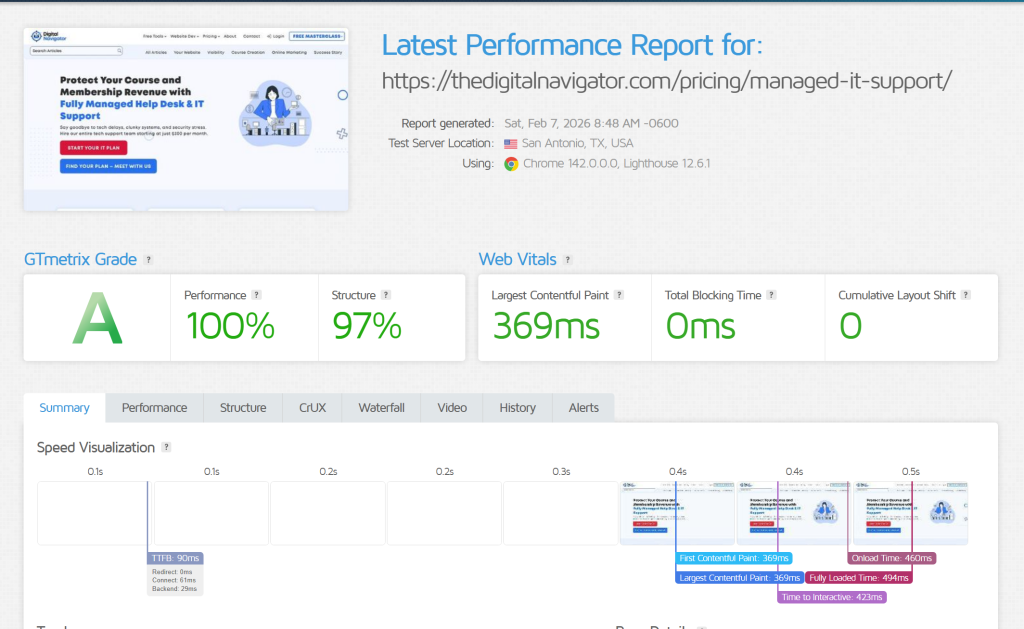
Just look at the stats we got on our latest product page release, the moment it was published! Here were the initial page results:
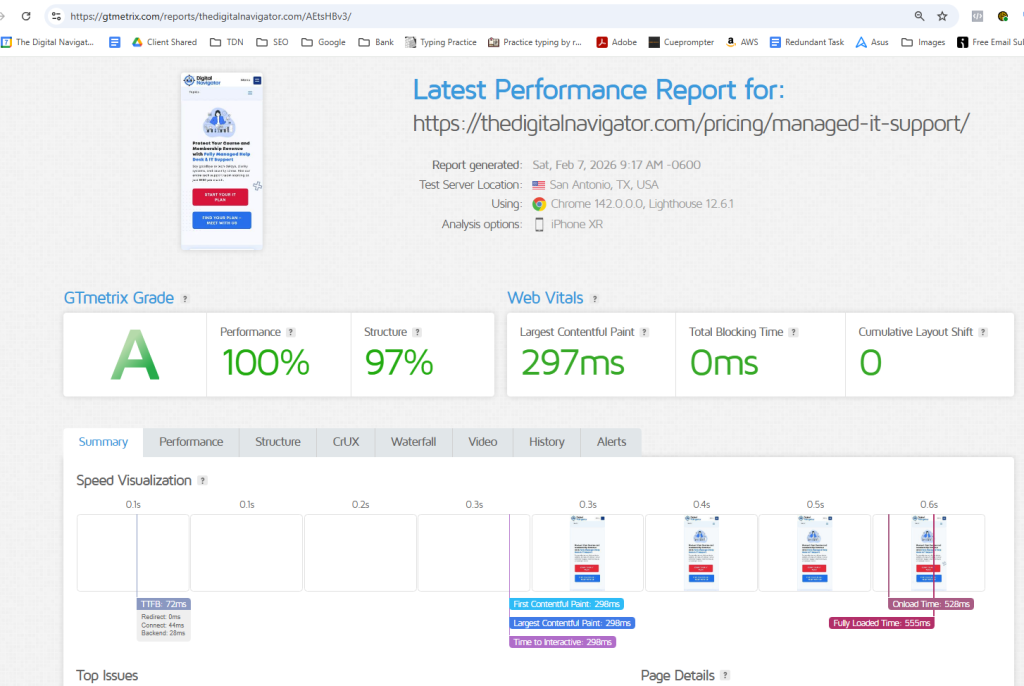
And how our speed stats were looking for mobile as well:
From there, we focus on the changes that improve how quickly your site loads and how clearly your message lands, without unnecessary redesign work.










0 Comments