
The Emoji Email Marketing Risks You Didn’t See Coming
Published Date:
23 Apr, 2026
Updated Date:
11 Jun, 2026
It is unsettling to realize that something as small and familiar as an emoji could be putting your email marketing (and your whole business) at risk.
You use them in everyday life. Your audience uses them too. They seem warm, modern, and harmless, so it makes sense that they would find their way into your email subject lines, website copy, CRM messages, and landing pages without much second thought.
Which is exactly why so many course creators, coaches, and membership site owners are caught off guard when they learn about the real emoji email marketing risks hiding behind those tiny symbols.
Why we had to tell you about emoji-related email marketing risks
After we published our article on small-business cybersecurity, one of the biggest surprises in our inbox was how many readers asked us about emojis.
Not malware. Not broken plugins. Not password issues. Emojis!
People were genuinely shocked to learn that something so common could affect email performance, brand trust, accessibility, and even certain aspects of website security.
Which makes sense. Most business owners are trying to make their marketing feel more human and approachable, not less professional or more vulnerable.
But when emojis are overused, poorly implemented, or pulled from unsafe third-party sources, they can do real damage behind the scenes.
Let’s begin!
Emoji Email Marketing Risks Go Beyond Your Inbox
For many online educators, coaches, and even spiritual teachers, emojis can feel like an easy way to make a message sound warmer and more approachable.
You might add one to an email subject line to make it feel more inviting, place one on a landing page to soften the tone, or include one in a welcome sequence to make the experience feel more personal. On the surface, it seems harmless, which is exactly why it often goes unquestioned.
The challenge is that these small choices do not stay isolated for long. Once emojis begin appearing across your email automations, WordPress templates, forms, checkout pages, and client-facing content, they can affect:
This is where emoji email marketing risks become more than a style preference, and become an actual threat to your business website and your bottom line.
.cp_style_274046 .cp-popup-content {font-family:Verdana;font-style:Normal;font-weight:Normal;}.cp_style_274046 .cp-popup-content{ border-style:none;border-color:#e1e1e1;border-width:1px 1px 1px 1px;border-radius:3px 3px 3px 3px;mobile-breakpoint:767;}.cp_style_274046 #panel-1-274046 .cp-target:hover { }.cp_style_274046 #panel-1-274046 { }.cp_style_274046 .cp-popup-content { width:580px;height:300px;background : #2770ec;background : -webkit-linear-gradient(90deg, #2770ec 47%, #d71439 47%);background : -moz-linear-gradient(90deg, #2770ec 47%, #d71439 47%);background : -ms-linear-gradient(90deg, #2770ec 47%, #d71439 47%);background : -o-linear-gradient(90deg, #2770ec 47%, #d71439 47%);background : linear-gradient(90deg, #2770ec 47%, #d71439 47%);}@media ( max-width: 767px ) {.cp_style_274046 .cp-popup-content{ border-style:none;border-color:#e1e1e1;border-width:1px 1px 1px 1px;border-radius:3px 3px 3px 3px;mobile-breakpoint:767;}.cp_style_274046 #panel-1-274046 .cp-target:hover { }.cp_style_274046 #panel-1-274046 { }.cp_style_274046 .cp-popup-content { width:360px;height:420px;background : #2770ec;background : -webkit-linear-gradient(0deg, #2770ec 33%, #d71439 33%);background : -moz-linear-gradient(0deg, #2770ec 33%, #d71439 33%);background : -ms-linear-gradient(0deg, #2770ec 33%, #d71439 33%);background : -o-linear-gradient(0deg, #2770ec 33%, #d71439 33%);background : linear-gradient(0deg, #2770ec 33%, #d71439 33%);}}.cp_style_274046 .cp-popup .cpro-form .cp-form-input-field{ font-family:inherit;font-style:inherit;font-weight:inherit;text-transform:none;font-size:13px;letter-spacing:0;text-align:left;color:#666;background-color:#fff;border-style:solid;border-width:1px 1px 1px 1px;border-radius:1px 1px 1px 1px;border-color:#bbb;active-border-color:#666;padding:0px 10px 0px 10px;}.cp_style_274046 #form_field-274046 .cp-target:hover { }.cp_style_274046 #form_field-274046 placeholder { color:#666;}.cp_style_274046 .cp-popup .cpro-form .cp-form-input-field input[type=’radio’], .cp_style_274046 .cp-popup .cpro-form .cp-form-input-field input[type=’checkbox’] {color:#666;background-color:#fff;}.cp_style_274046 .cp-popup .cpro-form .cp-form-input-field:focus {border-color: #666;}.cp_style_274046 .cp-popup .cpro-form .cp-form-input-field::-webkit-input-placeholder {color:#666;}.cp_style_274046 .cp-popup .cpro-form .cp-form-input-field::-moz-placeholder {color:#666;}.cp_style_274046 .cp-popup .cpro-form .pika-lendar table tbody button:hover { background :#666;}.cp_style_274046 .cp-popup .cpro-form .pika-lendar table tbody .is-selected .pika-button { background :#666;box-shadow : inset 0 1px 3px #666;}.cp_style_274046 #form_field-274046 { }@media ( max-width: 767px ) {.cp_style_274046 .cp-popup .cpro-form .cp-form-input-field{ font-family:inherit;font-style:inherit;font-weight:inherit;text-transform:none;font-size:8px;letter-spacing:0;text-align:left;color:#666;background-color:#fff;border-style:solid;border-width:1px 1px 1px 1px;border-radius:1px 1px 1px 1px;border-color:#bbb;active-border-color:#666;padding:0px 10px 0px 10px;}.cp_style_274046 #form_field-274046 .cp-target:hover { }.cp_style_274046 #form_field-274046 placeholder { color:#666;}.cp_style_274046 .cp-popup .cpro-form .cp-form-input-field input[type=’radio’], .cp_style_274046 .cp-popup .cpro-form .cp-form-input-field input[type=’checkbox’] {color:#666;background-color:#fff;}.cp_style_274046 .cp-popup .cpro-form .cp-form-input-field:focus {border-color: #666;}.cp_style_274046 .cp-popup .cpro-form .cp-form-input-field::-webkit-input-placeholder {color:#666;}.cp_style_274046 .cp-popup .cpro-form .cp-form-input-field::-moz-placeholder {color:#666;}.cp_style_274046 .cp-popup .cpro-form .pika-lendar table tbody button:hover { background :#666;}.cp_style_274046 .cp-popup .cpro-form .pika-lendar table tbody .is-selected .pika-button { background :#666;box-shadow : inset 0 1px 3px #666;}.cp_style_274046 #form_field-274046 { }}.cp_style_274046 #cp_shape-0-274046 .cp-target { fill:#d71439;stroke-width:2;width:25px;height:38px;}.cp_style_274046 #cp_shape-0-274046 .cp-target:hover { fill:#d71439;}.cp_style_274046 #cp_shape-0-274046 .cp-target { }.cp_style_274046 #cp_shape-0-274046 .cp-target ~ .cp-field-shadow { }.cp_style_274046 #cp_shape-0-274046 { }.cp_style_274046 #cp_shape-0-274046 .cp-rotate-wrap{ transform:rotate( 0deg);}.cp_style_274046 #cp_shape-0-274046 { }.cp_style_274046 #cp_shape-0-274046 { left: 16px;top: 0px;z-index:2;}@media ( max-width: 767px ) {.cp_style_274046 #cp_shape-0-274046 .cp-target { fill:#d71439;stroke-width:2;width:15px;height:22px;}.cp_style_274046 #cp_shape-0-274046 .cp-target:hover { fill:#d71439;}.cp_style_274046 #cp_shape-0-274046 .cp-target { }.cp_style_274046 #cp_shape-0-274046 .cp-target ~ .cp-field-shadow { }.cp_style_274046 #cp_shape-0-274046 { }.cp_style_274046 #cp_shape-0-274046 .cp-rotate-wrap{ transform:rotate( 0deg);}.cp_style_274046 #cp_shape-0-274046 { }.cp_style_274046 #cp_shape-0-274046 { left: 9px;top: 0px;z-index:2;}}.cp_style_274046 #cp_heading-0-274046 .cp-target { font-family:Montserrat;font-style:800;font-weight:800;font-size:24px;line-height:1.2;letter-spacing:0px;text-align:left;color:#ffffff;width:259px;height:112px;}.cp_style_274046 #cp_heading-0-274046 .cp-target:hover { }.cp_style_274046 #cp_heading-0-274046 .cp-rotate-wrap{ transform:rotate( 0deg);}.cp_style_274046 #cp_heading-0-274046 { left: 16px;top: 43px;z-index:3;}@media ( max-width: 767px ) {.cp_style_274046 #cp_heading-0-274046 .cp-target { font-family:Montserrat;font-style:800;font-weight:800;font-size:20px;line-height:1.2;letter-spacing:0px;text-align:center;color:#ffffff;width:319px;height:72px;}.cp_style_274046 #cp_heading-0-274046 .cp-target:hover { }.cp_style_274046 #cp_heading-0-274046 .cp-rotate-wrap{ transform:rotate( 0deg);}.cp_style_274046 #cp_heading-0-274046 { left: 19px;top: 214px;z-index:3;}}.cp_style_274046 #cp_button-1-274046 .cp-target { font-family:inherit;font-style:Inherit;font-weight:Inherit;font-size:14px;letter-spacing:0px;text-align:center;color:#fff;background:#d71439;width:219px;height:49px;padding:0px 15px 0px 15px;}.cp_style_274046 #cp_button-1-274046 .cp-target:hover { color:#fff;background:#b70b0b;}.cp_style_274046 #cp_button-1-274046 .cp-target { border-style:none;}.cp_style_274046 #cp_button-1-274046 .cp-target ~ .cp-field-shadow { border-style:none;}.cp_style_274046 #cp_button-1-274046 .cp-target { border-color:#757575;}.cp_style_274046 #cp_button-1-274046 .cp-target ~ .cp-field-shadow { border-color:#757575;}.cp_style_274046 #cp_button-1-274046 .cp-target { border-width:1px 1px 1px 1px;}.cp_style_274046 #cp_button-1-274046 .cp-target ~ .cp-field-shadow { border-width:1px 1px 1px 1px;}.cp_style_274046 #cp_button-1-274046 .cp-target { border-radius:0px 0px 0px 0px;}.cp_style_274046 #cp_button-1-274046 .cp-target ~ .cp-field-shadow { border-radius:0px 0px 0px 0px;}.cp_style_274046 #cp_button-1-274046 .cp-target > .cp-close-link { border-radius:0px 0px 0px 0px;}.cp_style_274046 #cp_button-1-274046 .cp-target > .cp-close-image { border-radius:0px 0px 0px 0px;}.cp_style_274046 #cp_button-1-274046 .cp-target { }.cp_style_274046 #cp_button-1-274046 .cp-target ~ .cp-field-shadow { }.cp_style_274046 #cp_button-1-274046 .cp-rotate-wrap{ transform:rotate( 0deg);}.cp_style_274046 #cp_button-1-274046 .cp-target:hover { }.cp_style_274046 #cp_button-1-274046 .cp-target:hover ~ .cp-field-shadow { }.cp_style_274046 #cp_button-1-274046 { left: 28px;top: 207px;z-index:9;}@media ( max-width: 767px ) {.cp_style_274046 #cp_button-1-274046 .cp-target { font-family:inherit;font-style:Inherit;font-weight:Inherit;font-size:14px;letter-spacing:0px;text-align:center;color:#fff;background:#d71439;width:150px;height:29px;padding:0px 15px 0px 15px;}.cp_style_274046 #cp_button-1-274046 .cp-target:hover { color:#fff;background:#b70b0b;}.cp_style_274046 #cp_button-1-274046 .cp-target { border-style:none;}.cp_style_274046 #cp_button-1-274046 .cp-target ~ .cp-field-shadow { border-style:none;}.cp_style_274046 #cp_button-1-274046 .cp-target { border-color:#757575;}.cp_style_274046 #cp_button-1-274046 .cp-target ~ .cp-field-shadow { border-color:#757575;}.cp_style_274046 #cp_button-1-274046 .cp-target { border-width:1px 1px 1px 1px;}.cp_style_274046 #cp_button-1-274046 .cp-target ~ .cp-field-shadow { border-width:1px 1px 1px 1px;}.cp_style_274046 #cp_button-1-274046 .cp-target { border-radius:0px 0px 0px 0px;}.cp_style_274046 #cp_button-1-274046 .cp-target ~ .cp-field-shadow { border-radius:0px 0px 0px 0px;}.cp_style_274046 #cp_button-1-274046 .cp-target > .cp-close-link { border-radius:0px 0px 0px 0px;}.cp_style_274046 #cp_button-1-274046 .cp-target > .cp-close-image { border-radius:0px 0px 0px 0px;}.cp_style_274046 #cp_button-1-274046 .cp-target { }.cp_style_274046 #cp_button-1-274046 .cp-target ~ .cp-field-shadow { }.cp_style_274046 #cp_button-1-274046 .cp-rotate-wrap{ transform:rotate( 0deg);}.cp_style_274046 #cp_button-1-274046 .cp-target:hover { }.cp_style_274046 #cp_button-1-274046 .cp-target:hover ~ .cp-field-shadow { }.cp_style_274046 #cp_button-1-274046 { left: 97px;top: 305px;z-index:9;}}.cp_style_274046 #cp_image-1-274046 .cp-target { width:313px;height:246px;}.cp_style_274046 #cp_image-1-274046 .cp-target:hover { }.cp_style_274046 #cp_image-1-274046 .cp-target { border-style:none;}.cp_style_274046 #cp_image-1-274046 .cp-target ~ .cp-field-shadow { border-style:none;}.cp_style_274046 #cp_image-1-274046 .cp-target { border-color:#757575;}.cp_style_274046 #cp_image-1-274046 .cp-target ~ .cp-field-shadow { border-color:#757575;}.cp_style_274046 #cp_image-1-274046 .cp-target { border-width:1px 1px 1px 1px;}.cp_style_274046 #cp_image-1-274046 .cp-target ~ .cp-field-shadow { border-width:1px 1px 1px 1px;}.cp_style_274046 #cp_image-1-274046 .cp-target { border-radius:0px 0px 0px 0px;}.cp_style_274046 #cp_image-1-274046 .cp-target ~ .cp-field-shadow { border-radius:0px 0px 0px 0px;}.cp_style_274046 #cp_image-1-274046 .cp-target > .cp-close-link { border-radius:0px 0px 0px 0px;}.cp_style_274046 #cp_image-1-274046 .cp-target > .cp-close-image { border-radius:0px 0px 0px 0px;}.cp_style_274046 #cp_image-1-274046 .cp-target { }.cp_style_274046 #cp_image-1-274046 .cp-target ~ .cp-field-shadow { }.cp_style_274046 #cp_image-1-274046 .cp-rotate-wrap{ transform:rotate( 0deg);}.cp_style_274046 #cp_image-1-274046 .cp-target:hover { }.cp_style_274046 #cp_image-1-274046 .cp-target:hover ~ .cp-field-shadow { }.cp_style_274046 #cp_image-1-274046 { left: 273px;top: 23px;z-index:11;}@media ( max-width: 767px ) {.cp_style_274046 #cp_image-1-274046 .cp-target { width:198px;height:144px;}.cp_style_274046 #cp_image-1-274046 .cp-target:hover { }.cp_style_274046 #cp_image-1-274046 .cp-target { border-style:none;}.cp_style_274046 #cp_image-1-274046 .cp-target ~ .cp-field-shadow { border-style:none;}.cp_style_274046 #cp_image-1-274046 .cp-target { border-color:#757575;}.cp_style_274046 #cp_image-1-274046 .cp-target ~ .cp-field-shadow { border-color:#757575;}.cp_style_274046 #cp_image-1-274046 .cp-target { border-width:1px 1px 1px 1px;}.cp_style_274046 #cp_image-1-274046 .cp-target ~ .cp-field-shadow { border-width:1px 1px 1px 1px;}.cp_style_274046 #cp_image-1-274046 .cp-target { border-radius:0px 0px 0px 0px;}.cp_style_274046 #cp_image-1-274046 .cp-target ~ .cp-field-shadow { border-radius:0px 0px 0px 0px;}.cp_style_274046 #cp_image-1-274046 .cp-target > .cp-close-link { border-radius:0px 0px 0px 0px;}.cp_style_274046 #cp_image-1-274046 .cp-target > .cp-close-image { border-radius:0px 0px 0px 0px;}.cp_style_274046 #cp_image-1-274046 .cp-target { }.cp_style_274046 #cp_image-1-274046 .cp-target ~ .cp-field-shadow { }.cp_style_274046 #cp_image-1-274046 .cp-rotate-wrap{ transform:rotate( 0deg);}.cp_style_274046 #cp_image-1-274046 .cp-target:hover { }.cp_style_274046 #cp_image-1-274046 .cp-target:hover ~ .cp-field-shadow { }.cp_style_274046 #cp_image-1-274046 { left: 81px;top: 61px;z-index:11;}}.cp_style_274046 #cp_heading-1-274046 .cp-target { font-family:Montserrat;font-style:800;font-weight:800;font-size:16px;line-height:1.2;letter-spacing:0px;text-align:left;color:#ffffff;width:224px;height:62px;}.cp_style_274046 #cp_heading-1-274046 .cp-target:hover { }.cp_style_274046 #cp_heading-1-274046 .cp-rotate-wrap{ transform:rotate( 0deg);}.cp_style_274046 #cp_heading-1-274046 { left: 25.5px;top: 149.5px;z-index:13;}@media ( max-width: 767px ) {.cp_style_274046 #cp_heading-1-274046 .cp-target { font-family:Montserrat;font-style:800;font-weight:800;font-size:20px;line-height:1.2;letter-spacing:0px;text-align:center;color:#ffffff;width:315px;height:94px;}.cp_style_274046 #cp_heading-1-274046 .cp-target:hover { }.cp_style_274046 #cp_heading-1-274046 .cp-rotate-wrap{ transform:rotate( 0deg);}.cp_style_274046 #cp_heading-1-274046 { left: 22.5px;top: 10.5px;z-index:13;}}@media ( max-width: 767px ) {.cp_style_274046 .cp-invisible-on-mobile {display: none !important;}}
Get your biggest security questions answered

Book a free call with our specialists today.
Why Emojis Can Create Website Security Risks

1. Emojis Are Not Always Just Text
One of the most important things to understand here is that not all emoji use carries the same level of risk. A standard emoji typed directly into a sentence is very different from an emoji system that relies on third-party libraries, remote assets, or custom rendering tools to display properly on your website.
That distinction matters more than most business owners realize. If your site is pulling in outside scripts, remote icon files, or custom emoji libraries just to create a certain look or feel, you are adding another layer of dependency to your website. And every extra dependency needs to be trustworthy, up to date, and carefully monitored.
This is why concerns around unsafe emoji sources on a website are worth taking seriously. If your course website is loading decorative emoji elements from an old plugin, a third-party CDN, a social embed, or a custom widget no one has reviewed in months, you are taking on technical risk without getting much strategic value in return.
We have seen situations where custom emoji assets introduced unnecessary exposure on a client site, and once those assets were removed and replaced with safer, vetted icon styling, the issue disappeared.
That is not the kind of problem most people expect from something as ordinary as an emoji, but it is exactly why this conversation matters for online business owners trying to build something stable and trustworthy.
Get free email marketing guide
2. Emoji Rendering Issues in Email and on Your Website Can Hurt Brand Trust
Even when emojis are not creating a direct security concern, they can still cause problems that affect how your business is perceived.
One of the biggest issues is inconsistent rendering. An emoji that looks polished and intentional on one device can appear awkward, broken, or visually off on another. Different email clients, browsers, and operating systems do not all display emojis the same way, which means the experience you think you are creating may not be the one your audience is actually having.
That matters more than it seems. It matters in email marketing, where first impressions are made in seconds. It matters on sales pages, where trust and clarity need to stay strong. And it matters in onboarding emails, client communication, and customer support, where a polished experience helps people feel they are in good hands.
For course creators, coaches, and spiritual teachers selling premium offers, even a small visual inconsistency can create doubt. A broken or strangely rendered emoji does not just look a little off. It can make the message feel less refined, less intentional, and less professional.
And when someone is deciding whether to open your email, trust your sales page, or invest in your program, that small moment of hesitation can have a bigger impact than you might expect.
The Hidden Cost of Emojis in CRM and Email Marketing

Can Emojis Hurt Email Open Rates?
Many business owners use emojis in subject lines because they assume more visibility will lead to more opens. On the surface, that logic makes sense. If an inbox is crowded, an emoji can help an email stand out visually.
The problem is that visibility and performance are not the same thing.
Getting noticed is only helpful if it also strengthens trust and gives someone a clear reason to open. In the same body of research, adding an emoji did not increase people’s desire to open that specific email, and it was also associated with a rise in negative sentiment.
So after all that, the email may have caught the eye, but it did not necessarily earn more respect or more interest.
That distinction matters a great deal for course creators, coaches, and spiritual teachers because you are not just trying to interrupt someone’s inbox – you are trying to build enough credibility that a potential student wants to hear from you again, click through to your offer, and feel confident taking the next step.
If an emoji gets your email noticed but makes the message feel less thoughtful, less relevant, or less professional, then it is not improving performance. It is creating friction at the very moment you need trust.
That is one of the clearest examples of emoji email marketing risks. An emoji can make an email more visually prominent while secretly weakening the quality of the response it receives.
Do Emojis Trigger Spam Filters or Hurt Deliverability?
This question comes up often, and the answer is a little more practical than dramatic.
Emojis do not automatically send your emails to spam. On their own, they are usually not the deciding factor.
But that does not mean they are neutral from a deliverability standpoint. The real issue is the overall pattern they contribute to. If a subject line starts to feel overly promotional, gimmicky, cluttered, or unclear, that affects how people engage with it. And once engagement drops, or complaints and unsubscribes rise, your sender reputation can start to suffer.
That is the piece many business owners miss. Because deliverability is not only about avoiding technical triggers. It is also about how real people respond to your emails over time.
If emojis contribute to lower-quality opens, more irritation, or more abuse reports, they become part of a much larger problem. Research cited from CMSwire found that while non-emoji subject lines performed slightly better on opens overall, emails with emojis also tended to see higher unsubscribe rates and more abuse complaints across most comparisons.
For online educators and service-based experts, that matters because email is rarely a one-time event. You are usually nurturing someone over a sequence of messages, not chasing a single click. A subject line that feels a little too eager or too performative may not destroy one campaign, but it can weaken the relationship you are trying to build across an entire launch, nurture sequence, or onboarding experience.
.cp_style_274057 .cp-popup-content {font-family:Verdana;font-style:Normal;font-weight:Normal;}.cp_style_274057 .cp-popup-content{ border-style:none;border-color:#e1e1e1;border-width:1px 1px 1px 1px;border-radius:3px 3px 3px 3px;mobile-breakpoint:767;}.cp_style_274057 #panel-1-274057 .cp-target:hover { }.cp_style_274057 #panel-1-274057 { }.cp_style_274057 .cp-popup-content { width:580px;height:300px;background : #2770ec;background : -webkit-linear-gradient(90deg, #2770ec 47%, #d71439 47%);background : -moz-linear-gradient(90deg, #2770ec 47%, #d71439 47%);background : -ms-linear-gradient(90deg, #2770ec 47%, #d71439 47%);background : -o-linear-gradient(90deg, #2770ec 47%, #d71439 47%);background : linear-gradient(90deg, #2770ec 47%, #d71439 47%);}@media ( max-width: 767px ) {.cp_style_274057 .cp-popup-content{ border-style:none;border-color:#e1e1e1;border-width:1px 1px 1px 1px;border-radius:3px 3px 3px 3px;mobile-breakpoint:767;}.cp_style_274057 #panel-1-274057 .cp-target:hover { }.cp_style_274057 #panel-1-274057 { }.cp_style_274057 .cp-popup-content { width:360px;height:420px;background : #2770ec;background : -webkit-linear-gradient(0deg, #2770ec 33%, #d71439 33%);background : -moz-linear-gradient(0deg, #2770ec 33%, #d71439 33%);background : -ms-linear-gradient(0deg, #2770ec 33%, #d71439 33%);background : -o-linear-gradient(0deg, #2770ec 33%, #d71439 33%);background : linear-gradient(0deg, #2770ec 33%, #d71439 33%);}}.cp_style_274057 .cp-popup .cpro-form .cp-form-input-field{ font-family:inherit;font-style:inherit;font-weight:inherit;text-transform:none;font-size:13px;letter-spacing:0;text-align:left;color:#666;background-color:#fff;border-style:solid;border-width:1px 1px 1px 1px;border-radius:1px 1px 1px 1px;border-color:#bbb;active-border-color:#666;padding:0px 10px 0px 10px;}.cp_style_274057 #form_field-274057 .cp-target:hover { }.cp_style_274057 #form_field-274057 placeholder { color:#666;}.cp_style_274057 .cp-popup .cpro-form .cp-form-input-field input[type=’radio’], .cp_style_274057 .cp-popup .cpro-form .cp-form-input-field input[type=’checkbox’] {color:#666;background-color:#fff;}.cp_style_274057 .cp-popup .cpro-form .cp-form-input-field:focus {border-color: #666;}.cp_style_274057 .cp-popup .cpro-form .cp-form-input-field::-webkit-input-placeholder {color:#666;}.cp_style_274057 .cp-popup .cpro-form .cp-form-input-field::-moz-placeholder {color:#666;}.cp_style_274057 .cp-popup .cpro-form .pika-lendar table tbody button:hover { background :#666;}.cp_style_274057 .cp-popup .cpro-form .pika-lendar table tbody .is-selected .pika-button { background :#666;box-shadow : inset 0 1px 3px #666;}.cp_style_274057 #form_field-274057 { }@media ( max-width: 767px ) {.cp_style_274057 .cp-popup .cpro-form .cp-form-input-field{ font-family:inherit;font-style:inherit;font-weight:inherit;text-transform:none;font-size:8px;letter-spacing:0;text-align:left;color:#666;background-color:#fff;border-style:solid;border-width:1px 1px 1px 1px;border-radius:1px 1px 1px 1px;border-color:#bbb;active-border-color:#666;padding:0px 10px 0px 10px;}.cp_style_274057 #form_field-274057 .cp-target:hover { }.cp_style_274057 #form_field-274057 placeholder { color:#666;}.cp_style_274057 .cp-popup .cpro-form .cp-form-input-field input[type=’radio’], .cp_style_274057 .cp-popup .cpro-form .cp-form-input-field input[type=’checkbox’] {color:#666;background-color:#fff;}.cp_style_274057 .cp-popup .cpro-form .cp-form-input-field:focus {border-color: #666;}.cp_style_274057 .cp-popup .cpro-form .cp-form-input-field::-webkit-input-placeholder {color:#666;}.cp_style_274057 .cp-popup .cpro-form .cp-form-input-field::-moz-placeholder {color:#666;}.cp_style_274057 .cp-popup .cpro-form .pika-lendar table tbody button:hover { background :#666;}.cp_style_274057 .cp-popup .cpro-form .pika-lendar table tbody .is-selected .pika-button { background :#666;box-shadow : inset 0 1px 3px #666;}.cp_style_274057 #form_field-274057 { }}.cp_style_274057 #cp_shape-0-274057 .cp-target { fill:#d71439;stroke-width:2;width:25px;height:38px;}.cp_style_274057 #cp_shape-0-274057 .cp-target:hover { fill:#d71439;}.cp_style_274057 #cp_shape-0-274057 .cp-target { }.cp_style_274057 #cp_shape-0-274057 .cp-target ~ .cp-field-shadow { }.cp_style_274057 #cp_shape-0-274057 { }.cp_style_274057 #cp_shape-0-274057 .cp-rotate-wrap{ transform:rotate( 0deg);}.cp_style_274057 #cp_shape-0-274057 { }.cp_style_274057 #cp_shape-0-274057 { left: 16px;top: 0px;z-index:2;}@media ( max-width: 767px ) {.cp_style_274057 #cp_shape-0-274057 .cp-target { fill:#d71439;stroke-width:2;width:15px;height:22px;}.cp_style_274057 #cp_shape-0-274057 .cp-target:hover { fill:#d71439;}.cp_style_274057 #cp_shape-0-274057 .cp-target { }.cp_style_274057 #cp_shape-0-274057 .cp-target ~ .cp-field-shadow { }.cp_style_274057 #cp_shape-0-274057 { }.cp_style_274057 #cp_shape-0-274057 .cp-rotate-wrap{ transform:rotate( 0deg);}.cp_style_274057 #cp_shape-0-274057 { }.cp_style_274057 #cp_shape-0-274057 { left: 9px;top: 0px;z-index:2;}}.cp_style_274057 #cp_heading-0-274057 .cp-target { font-family:Montserrat;font-style:800;font-weight:800;font-size:24px;line-height:1.2;letter-spacing:0px;text-align:left;color:#ffffff;width:228px;height:96px;}.cp_style_274057 #cp_heading-0-274057 .cp-target:hover { }.cp_style_274057 #cp_heading-0-274057 .cp-rotate-wrap{ transform:rotate( 0deg);}.cp_style_274057 #cp_heading-0-274057 { left: 23.5px;top: 42.5px;z-index:3;}@media ( max-width: 767px ) {.cp_style_274057 #cp_heading-0-274057 .cp-target { font-family:Montserrat;font-style:800;font-weight:800;font-size:20px;line-height:1.2;letter-spacing:0px;text-align:center;color:#ffffff;width:315px;height:35px;}.cp_style_274057 #cp_heading-0-274057 .cp-target:hover { }.cp_style_274057 #cp_heading-0-274057 .cp-rotate-wrap{ transform:rotate( 0deg);}.cp_style_274057 #cp_heading-0-274057 { left: 22.5px;top: 304px;z-index:3;}}.cp_style_274057 #cp_button-1-274057 .cp-target { font-family:inherit;font-style:Inherit;font-weight:Inherit;font-size:14px;letter-spacing:0px;text-align:center;color:#fff;background:#d71439;width:219px;height:49px;padding:0px 15px 0px 15px;}.cp_style_274057 #cp_button-1-274057 .cp-target:hover { color:#fff;background:#b70b0b;}.cp_style_274057 #cp_button-1-274057 .cp-target { border-style:none;}.cp_style_274057 #cp_button-1-274057 .cp-target ~ .cp-field-shadow { border-style:none;}.cp_style_274057 #cp_button-1-274057 .cp-target { border-color:#757575;}.cp_style_274057 #cp_button-1-274057 .cp-target ~ .cp-field-shadow { border-color:#757575;}.cp_style_274057 #cp_button-1-274057 .cp-target { border-width:1px 1px 1px 1px;}.cp_style_274057 #cp_button-1-274057 .cp-target ~ .cp-field-shadow { border-width:1px 1px 1px 1px;}.cp_style_274057 #cp_button-1-274057 .cp-target { border-radius:0px 0px 0px 0px;}.cp_style_274057 #cp_button-1-274057 .cp-target ~ .cp-field-shadow { border-radius:0px 0px 0px 0px;}.cp_style_274057 #cp_button-1-274057 .cp-target > .cp-close-link { border-radius:0px 0px 0px 0px;}.cp_style_274057 #cp_button-1-274057 .cp-target > .cp-close-image { border-radius:0px 0px 0px 0px;}.cp_style_274057 #cp_button-1-274057 .cp-target { }.cp_style_274057 #cp_button-1-274057 .cp-target ~ .cp-field-shadow { }.cp_style_274057 #cp_button-1-274057 .cp-rotate-wrap{ transform:rotate( 0deg);}.cp_style_274057 #cp_button-1-274057 .cp-target:hover { }.cp_style_274057 #cp_button-1-274057 .cp-target:hover ~ .cp-field-shadow { }.cp_style_274057 #cp_button-1-274057 { left: 28px;top: 207px;z-index:9;}@media ( max-width: 767px ) {.cp_style_274057 #cp_button-1-274057 .cp-target { font-family:inherit;font-style:Inherit;font-weight:Inherit;font-size:14px;letter-spacing:0px;text-align:center;color:#fff;background:#d71439;width:150px;height:29px;padding:0px 15px 0px 15px;}.cp_style_274057 #cp_button-1-274057 .cp-target:hover { color:#fff;background:#b70b0b;}.cp_style_274057 #cp_button-1-274057 .cp-target { border-style:none;}.cp_style_274057 #cp_button-1-274057 .cp-target ~ .cp-field-shadow { border-style:none;}.cp_style_274057 #cp_button-1-274057 .cp-target { border-color:#757575;}.cp_style_274057 #cp_button-1-274057 .cp-target ~ .cp-field-shadow { border-color:#757575;}.cp_style_274057 #cp_button-1-274057 .cp-target { border-width:1px 1px 1px 1px;}.cp_style_274057 #cp_button-1-274057 .cp-target ~ .cp-field-shadow { border-width:1px 1px 1px 1px;}.cp_style_274057 #cp_button-1-274057 .cp-target { border-radius:0px 0px 0px 0px;}.cp_style_274057 #cp_button-1-274057 .cp-target ~ .cp-field-shadow { border-radius:0px 0px 0px 0px;}.cp_style_274057 #cp_button-1-274057 .cp-target > .cp-close-link { border-radius:0px 0px 0px 0px;}.cp_style_274057 #cp_button-1-274057 .cp-target > .cp-close-image { border-radius:0px 0px 0px 0px;}.cp_style_274057 #cp_button-1-274057 .cp-target { }.cp_style_274057 #cp_button-1-274057 .cp-target ~ .cp-field-shadow { }.cp_style_274057 #cp_button-1-274057 .cp-rotate-wrap{ transform:rotate( 0deg);}.cp_style_274057 #cp_button-1-274057 .cp-target:hover { }.cp_style_274057 #cp_button-1-274057 .cp-target:hover ~ .cp-field-shadow { }.cp_style_274057 #cp_button-1-274057 { left: 105px;top: 363px;z-index:9;}}.cp_style_274057 #cp_image-1-274057 .cp-target { width:435px;height:253px;}.cp_style_274057 #cp_image-1-274057 .cp-target:hover { }.cp_style_274057 #cp_image-1-274057 .cp-target { border-style:none;}.cp_style_274057 #cp_image-1-274057 .cp-target ~ .cp-field-shadow { border-style:none;}.cp_style_274057 #cp_image-1-274057 .cp-target { border-color:#757575;}.cp_style_274057 #cp_image-1-274057 .cp-target ~ .cp-field-shadow { border-color:#757575;}.cp_style_274057 #cp_image-1-274057 .cp-target { border-width:1px 1px 1px 1px;}.cp_style_274057 #cp_image-1-274057 .cp-target ~ .cp-field-shadow { border-width:1px 1px 1px 1px;}.cp_style_274057 #cp_image-1-274057 .cp-target { border-radius:0px 0px 0px 0px;}.cp_style_274057 #cp_image-1-274057 .cp-target ~ .cp-field-shadow { border-radius:0px 0px 0px 0px;}.cp_style_274057 #cp_image-1-274057 .cp-target > .cp-close-link { border-radius:0px 0px 0px 0px;}.cp_style_274057 #cp_image-1-274057 .cp-target > .cp-close-image { border-radius:0px 0px 0px 0px;}.cp_style_274057 #cp_image-1-274057 .cp-target { }.cp_style_274057 #cp_image-1-274057 .cp-target ~ .cp-field-shadow { }.cp_style_274057 #cp_image-1-274057 .cp-rotate-wrap{ transform:rotate( 0deg);}.cp_style_274057 #cp_image-1-274057 .cp-target:hover { }.cp_style_274057 #cp_image-1-274057 .cp-target:hover ~ .cp-field-shadow { }.cp_style_274057 #cp_image-1-274057 { left: 209px;top: 28px;z-index:11;}@media ( max-width: 767px ) {.cp_style_274057 #cp_image-1-274057 .cp-target { width:215px;height:158px;}.cp_style_274057 #cp_image-1-274057 .cp-target:hover { }.cp_style_274057 #cp_image-1-274057 .cp-target { border-style:none;}.cp_style_274057 #cp_image-1-274057 .cp-target ~ .cp-field-shadow { border-style:none;}.cp_style_274057 #cp_image-1-274057 .cp-target { border-color:#757575;}.cp_style_274057 #cp_image-1-274057 .cp-target ~ .cp-field-shadow { border-color:#757575;}.cp_style_274057 #cp_image-1-274057 .cp-target { border-width:1px 1px 1px 1px;}.cp_style_274057 #cp_image-1-274057 .cp-target ~ .cp-field-shadow { border-width:1px 1px 1px 1px;}.cp_style_274057 #cp_image-1-274057 .cp-target { border-radius:0px 0px 0px 0px;}.cp_style_274057 #cp_image-1-274057 .cp-target ~ .cp-field-shadow { border-radius:0px 0px 0px 0px;}.cp_style_274057 #cp_image-1-274057 .cp-target > .cp-close-link { border-radius:0px 0px 0px 0px;}.cp_style_274057 #cp_image-1-274057 .cp-target > .cp-close-image { border-radius:0px 0px 0px 0px;}.cp_style_274057 #cp_image-1-274057 .cp-target { }.cp_style_274057 #cp_image-1-274057 .cp-target ~ .cp-field-shadow { }.cp_style_274057 #cp_image-1-274057 .cp-rotate-wrap{ transform:rotate( 0deg);}.cp_style_274057 #cp_image-1-274057 .cp-target:hover { }.cp_style_274057 #cp_image-1-274057 .cp-target:hover ~ .cp-field-shadow { }.cp_style_274057 #cp_image-1-274057 { left: 72.5px;top: 102px;z-index:11;}}.cp_style_274057 #cp_heading-1-274057 .cp-target { font-family:Montserrat;font-style:800;font-weight:800;font-size:16px;line-height:1.2;letter-spacing:0px;text-align:left;color:#ffffff;width:229px;height:62px;}.cp_style_274057 #cp_heading-1-274057 .cp-target:hover { }.cp_style_274057 #cp_heading-1-274057 .cp-rotate-wrap{ transform:rotate( 0deg);}.cp_style_274057 #cp_heading-1-274057 { left: 23px;top: 137.5px;z-index:13;}@media ( max-width: 767px ) {.cp_style_274057 #cp_heading-1-274057 .cp-target { font-family:Montserrat;font-style:800;font-weight:800;font-size:20px;line-height:1.2;letter-spacing:0px;text-align:center;color:#ffffff;width:315px;height:94px;}.cp_style_274057 #cp_heading-1-274057 .cp-target:hover { }.cp_style_274057 #cp_heading-1-274057 .cp-rotate-wrap{ transform:rotate( 0deg);}.cp_style_274057 #cp_heading-1-274057 { left: 22.5px;top: 23.5px;z-index:13;}}@media ( max-width: 767px ) {.cp_style_274057 .cp-invisible-on-mobile {display: none !important;}}
Want to automate basic course emails?

We can help you set up a system that’ll make life easier
Emoji Accessibility Problems Matter for Differently Abled Customers
It is easy to assume that one small emoji will not make much difference in a piece of content. For a sighted reader, that may seem true. But for someone using a screen reader, the experience can be very different.
Emojis come with built-in descriptions, which means assistive technology may read them aloud in full. Depending on the emoji and where it appears, that can interrupt the flow of a sentence, make the message feel awkward, or create confusion where you intended clarity. What looks playful and light on the screen can sound repetitive, distracting, or oddly placed when it is spoken aloud.
This becomes even more important in email marketing, where subject lines have very little room to do their job well. If an emoji is poorly placed, or if several are used together, it can dilute the meaning of the message before the reader has even decided whether the email is relevant. That matters for any business using email to build trust, communicate clearly, and guide people toward the next step. When the message feels harder to follow, the experience becomes less effective for everyone.
That is why emoji accessibility problems are not just a technical issue. They are a communication issue. If a page, email, or subject line needs to be understood clearly by everyone in your audience, decorative symbols should never carry the message. The words themselves should remain strong, readable, and easy to follow, with or without the added visual flair.
Get Free Social Media Planning Checklist
How to identify and remove emoji risks from your website
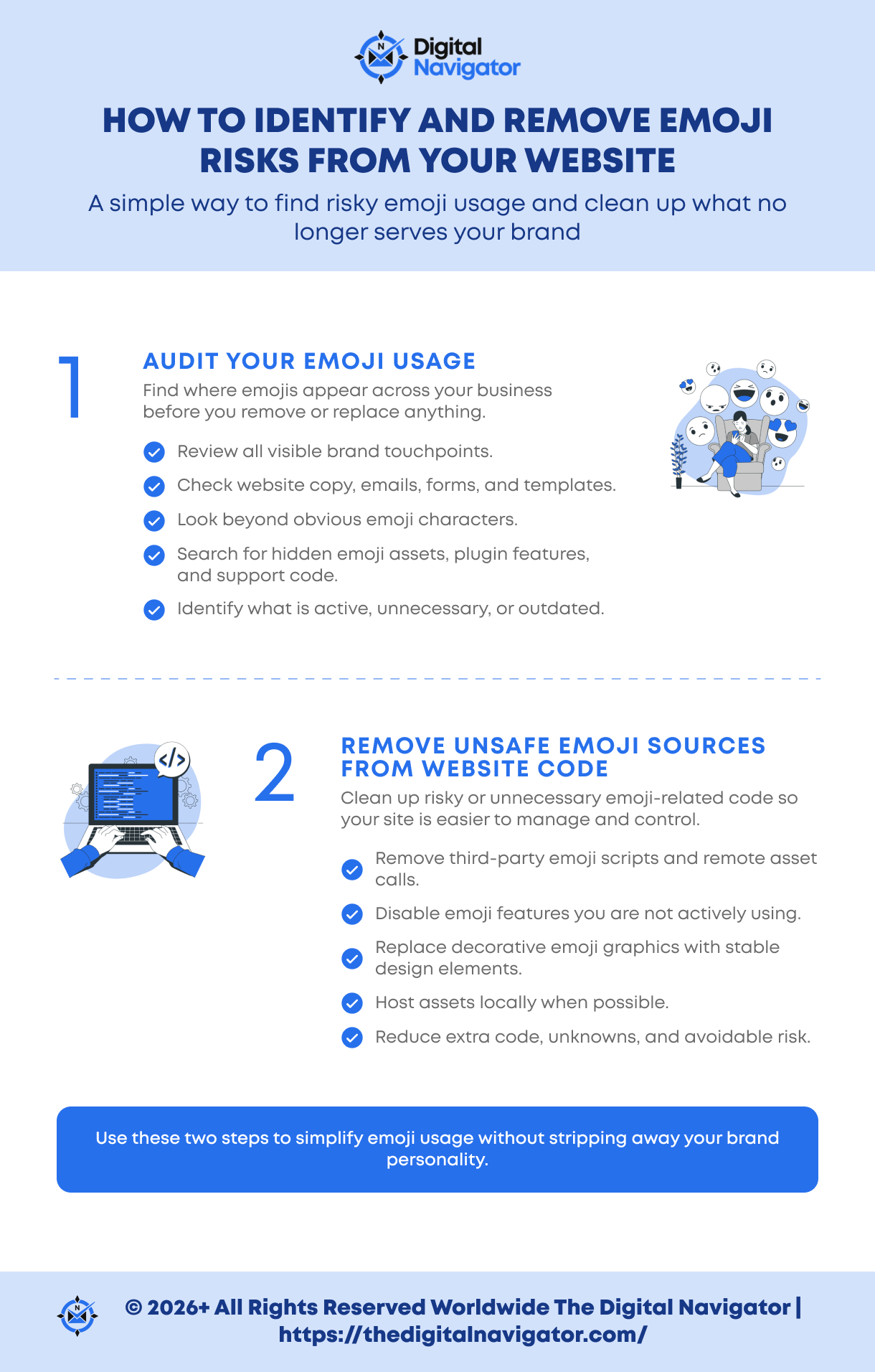
Step 1: Audit your emoji usage
Before you remove anything, you need a clear picture of where emojis are actually appearing across your business. For most course creators, coaches, and spiritual teachers, that usually means looking beyond the obvious places. It is not just your website copy. It is also your email subject lines, preheaders, nurture sequences, opt-in pages, blog posts, popups, forms, comments, and reusable templates.
On the website side, it helps to look for more than just visible emoji characters. You also want to check for external emoji asset calls, plugin-driven emoji features, and any styling or support code that may be loading in the background without adding real value. This is especially important on WordPress sites, where emoji-related code can sometimes remain active even when you are not intentionally using it in a strategic way.
Tools like Screaming Frog can make this process much easier because they allow you to search your site’s HTML and content for specific patterns, helping you spot where emojis or emoji-related elements are hiding.
This is one of those practical cleanup steps that often gets overlooked, simply because emojis feel too small to matter. In reality, that is exactly why they tend to stay buried in your systems long after they stop serving your brand well.
Step 2: Remove Unsafe Emoji Sources From Website Code
If your website depends on third-party emoji libraries, remote emoji assets, or plugin behavior that no one on your team can clearly trace, that is the first place to clean up.
This is where the idea to remove emojis from website code needs a little context. You are not necessarily wiping every emoji from your brand. You are removing the risky, unnecessary, or poorly controlled ways those emojis are being loaded and displayed across your site.
That may mean:
The goal is not to make your website feel cold or stripped down. The goal is to reduce unknowns, simplify your setup, and keep more control over the tools and assets your business relies on every day.
Hire Our Team To Manage Your Tech
A Safer Alternative to Emojis: Use Self-Hosted Icons Instead
If what you really want is visual emphasis rather than a playful tone, a controlled icon system is usually the better choice.
For many course creators, coaches, and spiritual teachers, the goal is not to make a page feel trendy. It is to guide attention, support the message, and create a polished experience that feels aligned with the quality of the offer.
In those cases, self-hosted icons are often a much safer and more professional solution than relying on third-party emoji sources or decorative add-ons scattered across your site.
This matters because you do not want to fix one dependency problem by creating another. If you remove risky emoji assets but replace them with a remotely loaded icon kit, you may still be depending on an outside source you do not fully control.
For online businesses, this is usually the stronger long-term move anyway. Icons are easier to style in a way that fits your brand, they scale more reliably across devices, and they tend to feel more deliberate inside a professional design system.
Just as importantly, they do not bring the same casual tone or trust concerns that can come with heavy emoji use in client-facing communication.
If your website needs visual cues, use visuals that strengthen the experience rather than distracting from it. In most cases, a well-managed icon system will do that far better.
Secure User-Generated Content to Reduce Website Vulnerabilities

If your platform allows comments, member posts, forum replies, or any other form of user-generated content, the solution is not simply to ban emojis and hope for the best. The smarter approach is to sanitize what users submit before it ever becomes part of your website experience.
This matters because user-generated content is one of the easiest places for messy code, copied formatting, pasted symbols, and risky markup to slip through unnoticed.
For online educators, coaches, and membership site owners, this is especially relevant when your site includes community features, discussion spaces, lesson comments, or client portals.
These areas are valuable for engagement, but they also need guardrails. If you are taking emojis and website vulnerabilities seriously, user-submitted content is one of the most practical places to strengthen your setup.
It is also wise to limit upload and editing privileges wherever possible. Not every user needs the ability to inject styled content, upload files, or alter what appears on important front-end pages.
The fewer people who can directly affect the live experience of your website, the easier it becomes to maintain a secure, consistent, and professional environment for everyone else.
Test for Accessibility and Consistency Before You Send
If you decide to keep emojis anywhere in your emails or on your website, they need to be tested with the same care you would give any other client-facing element.
On the website side, that means reviewing key pages with screen readers to make sure decorative symbols are not interrupting the flow of the message or making the content harder to understand.
In email marketing, it means previewing your subject lines and layouts across devices, inboxes, and operating systems so you can catch emoji rendering issues in email before they affect the reader experience. A subject line that looks polished in one environment can feel awkward, broken, or distracting in another.
This step is especially important for any business or brand that relies on digital communication to build trust and guide people toward action. Your emails often do more than share updates. They shape first impressions, set expectations, support sales conversations, and help people decide whether they feel confident engaging with your business.
That is why testing matters so much. It is one of the simplest ways to catch small issues before they quietly affect email performance, clarity, and credibility. If you are going to use emojis at all, use them deliberately, sparingly, and only after you know they display cleanly and support the experience you want your audience to have.
How To Protect Your Website From Emoji Risks and Preserve Marketing Trust
If you are not sure whether emojis are secretly affecting your email performance or introducing unnecessary risk into your website, it is worth looking at now, before it turns into a larger credibility or technical problem.
A focused audit can quickly show you:
Protect Your Website from Emoji Email Marketing Risks — Book a Free Consultation
If you want help reviewing emoji email marketing risks, removing unsafe emoji sources from your site, or creating a cleaner and more trustworthy communication system, book a free 25-minute consultation with our marketing specialists.
We’d love to help!











0 Comments